
Appearance
Inventory
Generally, when you're setting up inventory for the first time it for the initial setup of the GC file. When you setup inventory for the first time you will not be able to enter opening inventory and because of this you will need to consider this when you're reconciling opening retained earnings.
In GC, the prior year inventory details and the opening balance field is locked from editing. The only way to change the opening balance is to update the prior year. You can switch back to the prior year by changing the year that appears at the top of the inventory screen. If there are missing inventory items that need to be added to the current year that have an opening balance than they will need to be added to the prior year, otherwise they can just be added in the current year.
You can arrange items in a way that makes sense and this order will continue forward unless it an adjustment to a prior year. In which case you will need to shuffle it around in the current year but moving forward the order will be retained.
If there is an item that is no longer required to be tracked you can delete the row by selecting the entire row and the best way to do this is by selecting the row header (which is the dark bit on the left at the beginning of the row). Be aware that the next time that you open you will be prompted and asked if you want to carry this row forward (simply click no). In the following year, since the row no longer exists you will not be prompted again.
WARNING
Before adding new inventory records - after rolling the inventory records from the prior year - be sure to Save. Otherwise, the final inventory record could be lost.
In addition to shuffling the rows you can also get straight to the point and insert a line. Do this by positioning yourself where you want to insert the and then hold Ctrl + I just like when you're doing bookkeeping.
Maintaining Continuity
In order to maintain continuity year-over-year GC matches:
- Description
- Unit
- the Purchased indicator Pur.
If one of the above changes without the prior years changing then GC will not be able to associate a prior inventory record with its corresponding historical record. 
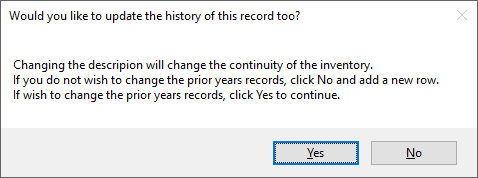
If there is a correction that is required to one of these fields and the historical records should be updated, proceed with the change in the current year. After updating the field you will be prompted to confirm that you wish to update the historical records - click Yes. Otherwise click No and your changes will be rolled back.
Best Practices for Purchased Inventory
Purchased inventory is primarily for tax planning purposes and it is often missing in the setup process because inventory detailed is pulled from financial statements and generally financial statements don't include that information.
Unless an inventory record is entirely purchased than you should create a new row for the purchased inventory and separate your purchased inventory from your produced inventory. The opening balance will be dedicated to the produced inventory while your newly created purchased inventory record will have no opening but your current year will reflect the difference in purchased and produced inventory.
However, if you wish to show the correct purchased inventory then you will need to go back to the lesser of the beginning of inventory recording in GC or when the purchased inventory should have began.
Changing Order of Inventory Records
Click on a cell in the row that you want to move. Hold down the Alt key and use the Up arrow key or Down arrow key to move the record reprectively