
Appearance
CCA
If you need to change the CCA schedule's opening balances, just change the opening balances.
If you need to change the closing balance you can do so but if you click Calc before Save your changes will be over written.
If you need to transfer a balance from one class to another:
- In the adjustment field enter a negative number in the class you're moving the balance from, and;
- In the adjustment field enter a positive number in the class you're moving the balance to.
To block CCA:
- Either check the Block CCA/CEC button (this will toggle between blocking all the classes or not blocking all the classes)
- First, set to EDIT mode (button at the top, between the division dropdown and the Tx to XL). Individually check the rows that you want to block CCA from being calculated.
- Calc and Save
Export Asset Acquisitions and Dispositions to Excel
To export a list of assets that are being added or disposed of just click the Tx to Excel button. 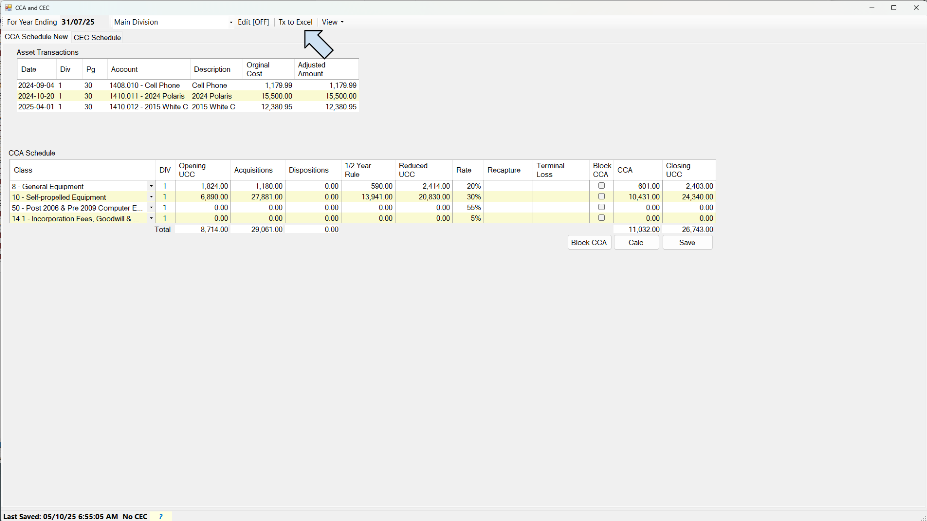
Quick note on CEC:
- Effective January 1, 2017, the rules governing eligible capital property (ECP) are replaced by the new Class 14.1 to Schedule II of the Income Tax Regulations. Property that would be eligible capital property prior to January 1, 2017, will be depreciable property in the new Class 14.1 after December 31, 2016.
- Prior to 2017, a separate cumulative eligible capital (CEC) account must be kept for each business. Effective January 1, 2017, subsection 1101(1) of the Income Tax Regulations provides for a separate Class 14.1 in respect of each business of the taxpayer.
Accelerated Investment Incentive (AII)
The Government of Canada's 2018 Fall Economic Statement was tabled on November 21, 2018.
It proposes the following measures for eligible property:
- Accelerated Investment Incentive – Providing an enhanced first-year allowance for certain eligible property that is subject to the Capital Cost Allowance (CCA) rules. In general, the incentive will be made up of two elements:
- applying the prescribed CCA rate for a class to up to one-and-a-half times the net addition to the class for the year
- suspending the existing CCA half-year rule (and equivalent rules for Canadian vessels and class 13 property)
- Full Expensing for Manufacturers and Processors – Allowing businesses to immediately write off the full cost of machinery and equipment used for the manufacturing or processing of goods (class 53).
- Full Expensing for Clean Energy Investments – Allowing businesses to immediately write off the full cost of specified clean energy equipment (classes 43.1 and 43.2).
You must acquire the eligible property after November 20, 2018, and it must be available for use before 2028 in order to qualify for the incentive or the full expensing measure. A phase-out will begin for property that becomes available for use after 2023.
For more information, see CRA Accelerated Investment Incentive.
2022 Update to 10.1 Purchase Threshold
10.1 assets purchased after December 31, 2021, have a capitalization limit increase to $34,000 (up from $30,000). Consequently, the limit on the ITC has increased to $1,700 (up from $1,500).
As of the time of writing, CRA has not updated there publications with the new rate. Temporarily refer to TaxTips.ca.
Immediate Expensing
In addition to the enhanced CCA deductions available under existing rules, such as the full expensing for classes 43.1, 43.2, and 53, the budget proposed to provide temporary immediate expensing for certain property acquired by a CCPC. It would be limited to $1.5 million per tax year. The half‑year rule would be suspended for such property.
This measure would apply to all capital property that is subject to CCA rules, other than property included in classes 1 to 6, 14.1, 17, 47, 49, and 51. The eligible property would have to be acquired after April 18, 2021, and become available for use before 2024.
For further information see Canada.ca
GC's Approach
Since most of the rules that limit the use of the immediate expensing measure, GC has taken a dumb approach and expects the user to adjust the claim on a case by case basis.